

What Is Notion and Why Is It So Popular?
Notion Review 2026 has grown from a niche productivity app into something that feels closer to a digital operating system for your life. If you’ve ever tried juggling notes, tasks, calendars, and databases across multiple apps, you’ll immediately understand why Notion gained such traction. It promises one thing above all: everything in one place, and surprisingly, it mostly delivers on that promise.
At its core, Notion is a modular workspace where you can build anything—from a simple to-do list to a full-blown company wiki. The appeal lies in its flexibility. Unlike rigid tools that force you into a predefined structure, Notion gives you a blank canvas. You decide how things should look, behave, and connect. That freedom is both its biggest strength and, for some users, its biggest challenge.
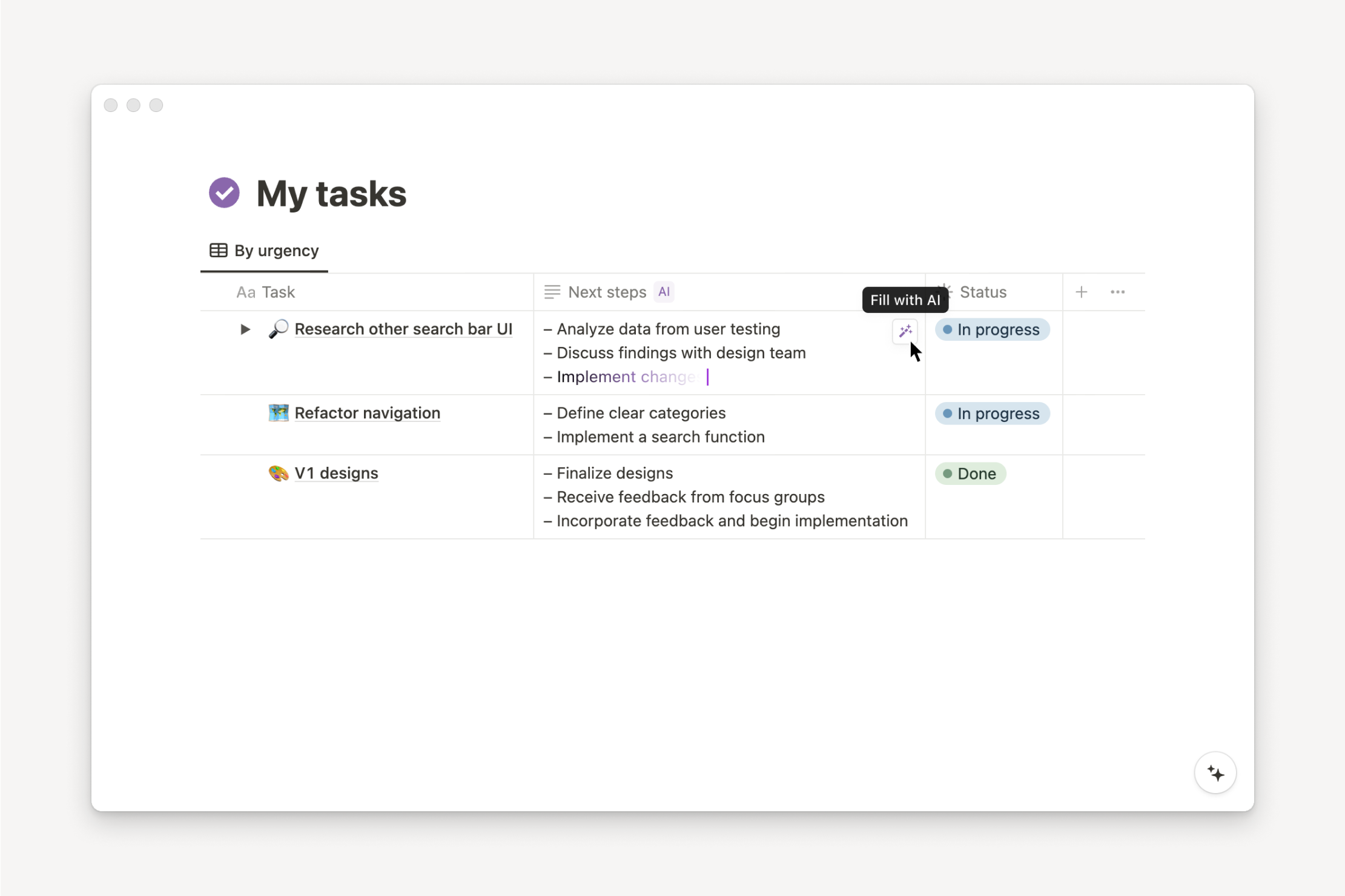
In 2026, Notion has become even more relevant thanks to its deep integration of AI-powered tools, smarter automation, and improved performance. According to recent productivity software trends, platforms that combine note-taking, project management, and AI assistance are seeing rapid adoption, and Notion sits right at the center of that movement.
What really sets Notion apart is how it adapts to different users. A student can use it for lecture notes and study planning, while a startup team can run entire operations through it. It’s like having a digital Swiss Army knife—versatile, compact, and surprisingly powerful once you know how to use it.
The Evolution of Notion Over the Years
Notion didn’t become a powerhouse overnight. Its journey has been a gradual transformation shaped by user feedback, technological shifts, and a growing demand for all-in-one tools. Early versions of Notion were already flexible, but they lacked the speed and polish that modern users expect. Fast forward to 2026, and the platform feels far more refined, responsive, and intelligent.
One of the biggest turning points came with the introduction of Notion AI, which fundamentally changed how users interact with their workspace. Instead of just storing information, Notion began helping users create, summarize, and organize content automatically. This shift turned it from a passive tool into an active assistant.
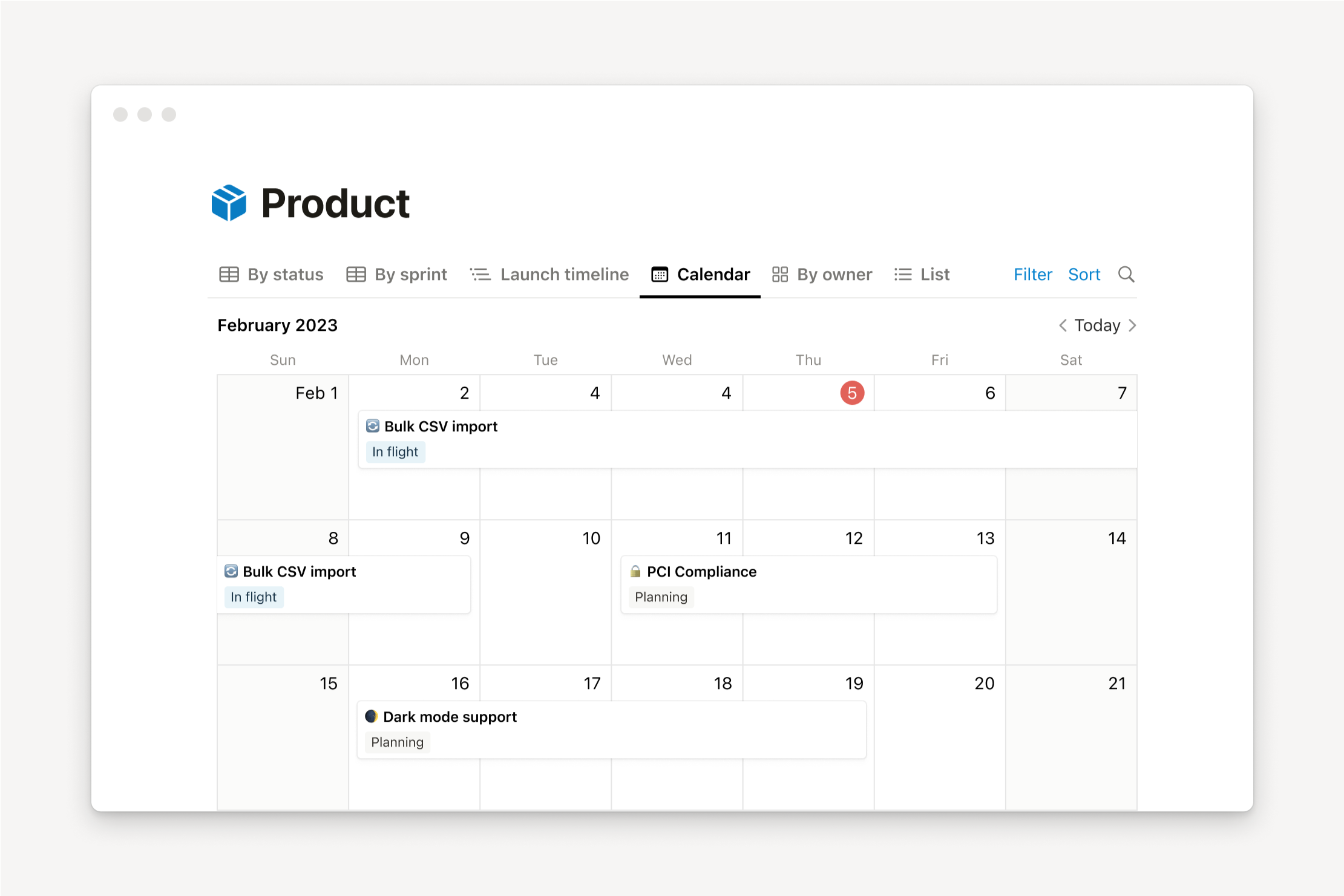
Another key milestone was the enhancement of database functionality. Notion databases are no longer just simple tables—they’ve evolved into powerful relational systems capable of managing complex workflows. Think of them as lightweight CRMs, content calendars, or even financial trackers, all within the same interface.
Performance improvements have also played a huge role. Earlier criticisms about lag and slow loading times have been addressed significantly. In 2026, Notion feels faster and more stable, making it suitable not just for individuals but also for large teams handling massive datasets.
The platform has also expanded its ecosystem through integrations and API enhancements. This means you can now connect Notion with tools like Slack, Google Drive, and Zapier more seamlessly than ever before. It’s no longer just a standalone app—it’s part of a broader productivity ecosystem.
Key Use Cases That Drive Its Popularity
What makes Notion truly stand out is how many different problems it solves at once. It’s not just a note-taking app, and it’s not just a project management tool—it’s both, and more. That versatility is the reason behind its massive and growing user base.
For individuals, Notion often becomes a personal productivity hub. People use it to track goals, manage daily tasks, journal, and even plan vacations. The ability to customize layouts means you can design a system that actually matches how your brain works, instead of forcing yourself into someone else’s framework.
For students, Notion acts like a digital backpack. Lecture notes, assignments, study schedules, and research materials can all live in one organized space. Many students also use templates to streamline their workflow, which saves time and reduces mental clutter.
In professional settings, Notion shines as a team collaboration tool. Teams use it to manage projects, document processes, and maintain knowledge bases. Instead of scattered documents and endless email threads, everything is centralized and accessible.
Content creators and freelancers also find immense value in Notion. It’s common to see creators using it for content calendars, idea tracking, and even scriptwriting. The addition of AI tools makes brainstorming and drafting faster than ever.
Ultimately, Notion’s popularity comes down to one simple idea: it adapts to you. Whether you’re organizing your life or running a business, it offers a level of flexibility that few tools can match.
Notion’s Core Features in 2026
When you dive into Notion, it quickly becomes clear that its strength lies in its building blocks—literally. Everything you create inside Notion is made up of blocks, and this modular system is what allows for such deep customization. But in 2026, these features have gone beyond simple building blocks into something far more dynamic and intelligent.
Notion now combines content creation, data organization, and AI assistance into a single cohesive experience. You’re not just writing notes—you’re building interconnected systems that can evolve over time. Imagine creating a task list that automatically updates based on project progress, or a knowledge base that suggests related content as you type. That’s the level Notion is operating at now.
Another standout feature is how seamlessly different elements work together. You can embed databases inside pages, link tasks to documents, and create dashboards that give you a bird’s-eye view of your entire workflow. This interconnected structure makes it easier to manage complex projects without feeling overwhelmed.
The introduction of smarter automation has also reduced the need for manual updates. Repetitive tasks can now be handled automatically, freeing up time for more meaningful work. Combined with AI, this makes Notion feel less like a tool and more like a digital partner in your productivity journey.
Blocks and Customization System
If Notion had a heartbeat, it would be its block system. Every piece of content—whether it’s text, an image, a checklist, or a database—is a block. This might sound simple, but it’s what gives Notion its incredible flexibility.
You can drag and drop blocks anywhere, nest them inside each other, and transform them into different formats with just a click. Want to turn a paragraph into a checklist? Done. Need to convert a list into a table? Easy. This fluidity makes it incredibly intuitive once you get the hang of it.
Customization goes far beyond just moving blocks around. You can design entire pages from scratch, complete with columns, callouts, embedded media, and interactive elements. It’s like having a website builder inside your note-taking app.
For users who love structure, templates are a game-changer. Notion offers a wide range of pre-built templates, and the community has created thousands more. Whether you’re building a habit tracker or a business dashboard, there’s likely a template that gets you halfway there.
The real magic happens when you combine blocks with other features like databases and AI. Suddenly, your simple notes can evolve into complex systems that adapt to your needs. It’s this level of customization that keeps users coming back—and keeps competitors struggling to keep up.
Databases and Advanced Organization
If blocks are the foundation of Notion, then databases are the engine that powers everything meaningful you can build. In 2026, Notion’s database system has matured into something that feels surprisingly close to professional-grade data management tools—without the overwhelming complexity. At first glance, a Notion database might look like a simple table, but once you start exploring its capabilities, it quickly reveals itself as a highly dynamic and adaptable system.
What makes Notion databases so powerful is their flexibility. You can view the same dataset in multiple formats—table, board (Kanban), calendar, gallery, or timeline—depending on what suits your workflow. Imagine managing a content calendar: one moment you’re viewing it as a calendar to track deadlines, and the next you switch to a Kanban board to monitor progress. This fluidity eliminates the need for multiple tools, which is exactly why so many users migrate fully into Notion.
Another standout feature is relational databases and rollups. These allow you to connect different databases together, creating a network of linked information. For example, you can link tasks to projects, projects to clients, and clients to invoices—all within the same workspace. It’s like building your own mini-CRM or project management system without writing a single line of code. This level of interconnectivity is where Notion starts to feel less like a note-taking app and more like a customizable operating system.
In 2026, performance improvements have made working with large databases far smoother. Earlier complaints about lag when handling big datasets have largely been addressed, making it viable for teams managing hundreds or even thousands of entries. Combined with filters, sorting, and automation, databases in Notion are no longer just organizational tools—they’re decision-making tools that help you see patterns, track progress, and stay in control.
AI Integration in Notion
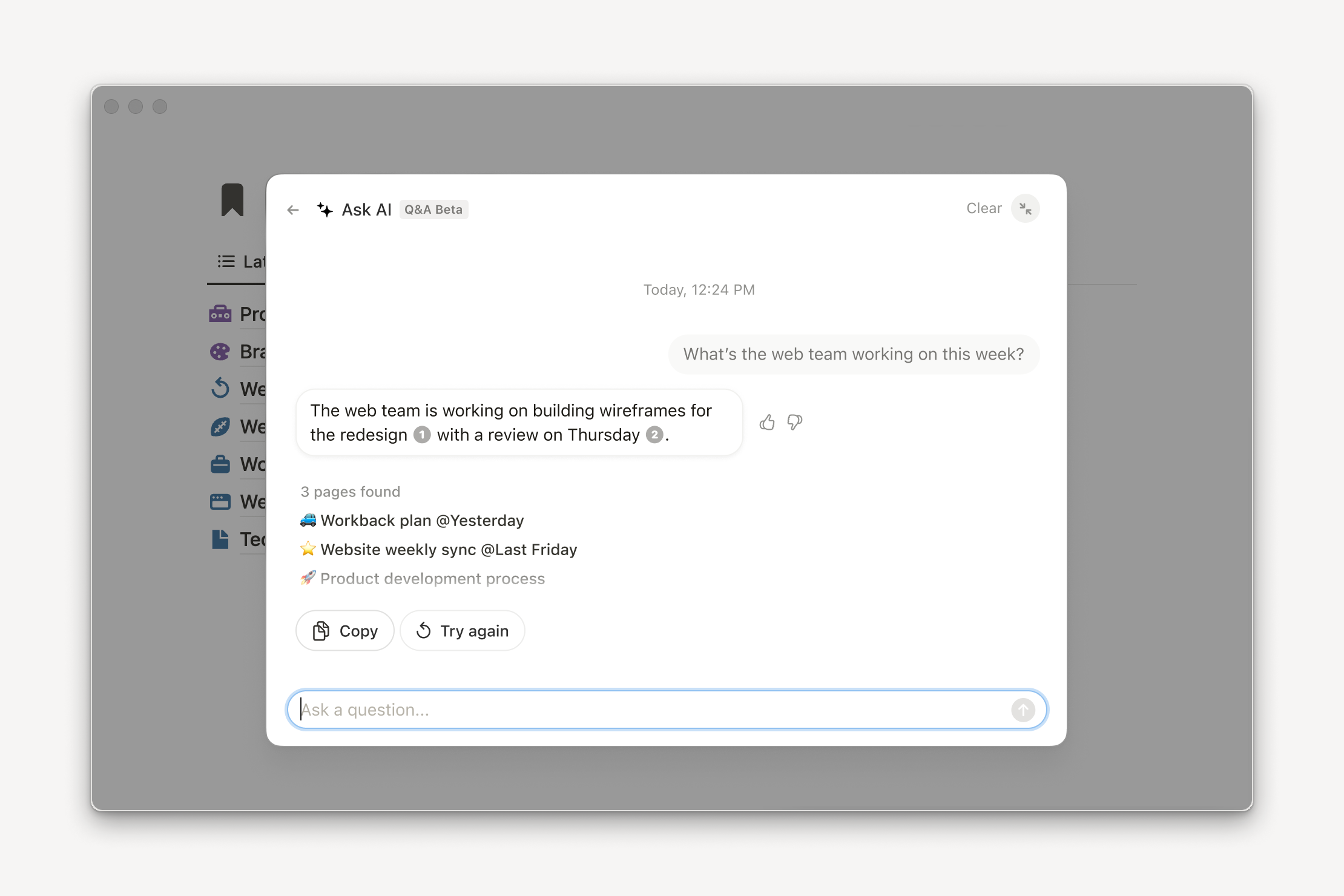
The introduction of Notion AI marked a turning point, but in 2026, it’s no longer just an add-on—it’s deeply embedded into the entire experience. Instead of treating AI as a separate feature, Notion has woven it into how you write, organize, and think. It’s like having a quiet assistant sitting beside you, ready to help whenever you hit a wall.
One of the most noticeable improvements is how naturally AI fits into the writing process. You can start drafting an idea, and Notion AI can expand it, refine it, or even change its tone depending on your needs. Whether you’re writing meeting notes, blog posts, or business proposals, the AI can help you move faster without sacrificing quality. It doesn’t just generate text—it understands context, which makes its suggestions feel relevant rather than generic.
Beyond writing, AI plays a huge role in summarization and knowledge management. Long documents can be condensed into key points within seconds, saving you from information overload. This is especially useful for teams dealing with large volumes of data or documentation. Instead of digging through endless pages, you can get straight to what matters.
Automation is another area where AI shines. Routine tasks like updating statuses, generating reports, or organizing content can now be handled with minimal input. This reduces friction in your workflow and allows you to focus on more strategic work. In many ways, Notion AI transforms the platform from a static workspace into a living system that evolves alongside your needs.
User Interface and Experience
Notion’s interface has always walked a fine line between simplicity and complexity. On the surface, it looks clean and minimal—almost deceptively so. But underneath that simplicity lies a powerful system that can either feel liberating or overwhelming, depending on how you approach it. In 2026, the user experience has been refined to make that balance easier to manage.
The first thing you’ll notice is the distraction-free design. There are no unnecessary buttons or clutter competing for your attention. Everything is hidden until you need it, which creates a sense of calm while working. This design philosophy aligns perfectly with Notion’s goal of being a flexible workspace rather than a rigid tool.
Navigation has also improved significantly. With better sidebar organization, faster search functionality, and smarter suggestions, finding what you need feels more intuitive. You’re not just clicking through pages—you’re moving through a connected system where everything has a place.
However, the real story of Notion’s user experience lies in how it adapts to different skill levels. Beginners can start with simple pages and gradually explore more advanced features, while power users can build incredibly complex systems. It’s this scalability that makes Notion appealing to such a wide audience.
Ease of Use for Beginners
For newcomers, Notion can feel like walking into an empty room and being told to build your own furniture. That level of freedom is exciting, but it can also be intimidating. In 2026, Notion has made significant efforts to lower this barrier with better onboarding, guided templates, and interactive tutorials.
When you first sign up, you’re no longer greeted with a completely blank slate. Instead, Notion offers starter templates tailored to different use cases—personal planning, student life, team collaboration, and more. These templates act as training wheels, helping you understand how the system works without feeling overwhelmed.
The command menu (triggered by typing “/”) remains one of Notion’s most intuitive features. It allows you to insert blocks, format content, and access features بسرعة, all without navigating complex menus. This keeps the learning curve manageable and encourages experimentation.
Despite these improvements, there’s still a learning curve. Notion isn’t a plug-and-play tool—it rewards curiosity and patience. But once you get past the initial phase, everything starts to click. What once felt confusing begins to feel empowering, and you realize that the effort you put in upfront pays off in long-term productivity gains.
Flexibility for Advanced Users
While beginners are given a gentle introduction, advanced users are where Notion truly shines. If you enjoy building systems, optimizing workflows, and experimenting with new ideas, Notion becomes a playground of possibilities. In 2026, the platform offers even more tools for those who want to push its limits.
Advanced users can create highly customized dashboards that integrate multiple databases, widgets, and automation tools. These dashboards can serve as command centers for entire businesses, providing real-time insights into projects, tasks, and performance metrics. It’s like having a personalized control panel for your work and life.
The use of formulas and relational databases adds another layer of sophistication. You can automate calculations, track dependencies, and create dynamic views that update automatically. This level of functionality rivals dedicated project management and database tools, but with far greater flexibility.
Integration capabilities have also expanded, allowing advanced users to connect Notion with external tools and workflows. Whether it’s syncing with calendars, pulling data from APIs, or automating tasks through third-party services, Notion can fit seamlessly into a larger tech ecosystem.
At this level, Notion stops being just a tool—it becomes a system you design and control. And that’s what keeps power users deeply invested in the platform.
Notion AI: Game-Changer or Gimmick?
The rise of AI in productivity tools has sparked a lot of debate, and Notion is right at the center of it. Some see Notion AI as a revolutionary feature that transforms how we work, while others question whether it’s just another layer of automation that adds more noise than value. The truth, as usual, lies somewhere in between.
What makes Notion AI stand out is how seamlessly it integrates into the workflow. It doesn’t feel like a separate tool you have to open—it’s embedded directly into your writing and organization process. This makes it more accessible and, in many cases, more useful than standalone AI tools.
However, its effectiveness depends heavily on how you use it. If you expect it to do all the thinking for you, you’ll likely be disappointed. But if you treat it as a collaborator—a tool that enhances your ideas rather than replaces them—it can significantly boost your productivity.
Writing, Summarizing, and Automation
One of the most practical uses of Notion AI is in content creation. Whether you’re drafting emails, writing reports, or brainstorming ideas, the AI can help you get started and refine your work. It’s particularly useful for overcoming writer’s block, as it provides a starting point that you can build upon.
Summarization is another area where it excels. Long meeting notes, research documents, or articles can be condensed into key takeaways in seconds. This not only saves time but also helps you focus on what’s important.
Automation, powered by AI, reduces repetitive tasks. Instead of manually updating statuses or organizing content, you can rely on the system to handle these tasks intelligently. This creates a smoother workflow and reduces the mental load of managing details.
Real Productivity Impact
So, does Notion AI actually make you more productive? For many users, the answer is yes—but with a caveat. The real benefit comes from time saved on small tasks, which adds up over time. Writing faster, organizing information more efficiently, and reducing manual work all contribute to a noticeable productivity boost.
However, it’s not a magic solution. Productivity still depends on how well you structure your workflow and use the tools available. Notion AI enhances what you’re already doing—it doesn’t replace the need for clear thinking and effective planning.
For teams, the impact can be even greater. Shared knowledge bases, automated summaries, and consistent documentation all contribute to better collaboration and decision-making. In this context, Notion AI feels less like a gimmick and more like a meaningful evolution of the platform.
Collaboration and Team Features
Notion has steadily transformed from a personal productivity tool into a full-fledged collaboration platform, and by 2026, it comfortably sits alongside (and often replaces) tools like Slack, Google Docs, and even parts of project management software. What makes Notion’s approach to collaboration unique is that it doesn’t just enable communication—it centralizes context, content, and coordination in one place. That means fewer scattered conversations and more meaningful, documented workflows.
At the heart of this experience is real-time collaboration. Multiple users can work on the same page simultaneously, leave comments, tag teammates, and make edits that are instantly visible. This eliminates the endless back-and-forth of version control that plagues traditional document tools. You’re no longer wondering which file is the “latest” version—it’s always up to date.
Another key strength lies in shared workspaces. Teams can create dedicated spaces for projects, departments, or company-wide knowledge bases. These spaces act as living documents that evolve over time, ensuring that information is always accessible and relevant. Instead of digging through emails or chat threads, team members can quickly find what they need in a structured, searchable environment.
Notion also supports permission controls, allowing teams to manage who can view, comment, or edit specific pages. This is particularly useful for larger organizations where sensitive information needs to be protected. Combined with integrations and automation, Notion becomes more than just a workspace—it becomes the backbone of how teams operate daily.
Real-Time Editing and Sharing
Real-time editing in Notion feels fluid and natural, almost like everyone is sitting at the same desk working together. As soon as someone types, you see it. Comments appear instantly, and changes are tracked without disrupting the flow of work. This immediacy fosters a sense of collaboration that’s hard to replicate with traditional tools.
Sharing content is equally seamless. You can invite team members via email, generate shareable links, or even publish pages to the web. This flexibility makes it easy to collaborate both internally and externally. For example, agencies can share project dashboards with clients, giving them real-time visibility into progress without needing constant updates.
One underrated feature is the ability to embed content from other tools. Whether it’s Google Docs, Figma designs, or Loom videos, everything can live inside Notion. This reduces the need to switch between apps, which in turn minimizes distractions and improves focus.
The result is a collaboration experience that feels cohesive rather than fragmented. Instead of juggling multiple platforms, teams can operate within a single, unified environment where everything is interconnected.
Workspace Management
Managing a workspace in Notion is like organizing a digital office. You decide how everything is structured, who has access to what, and how information flows between different areas. In 2026, workspace management has become more intuitive, with better tools for scaling as teams grow.
Admins can create hierarchies of pages and databases, ensuring that information is logically organized. This is especially important for larger teams where chaos can quickly take over if there’s no clear structure. With proper organization, Notion becomes a powerful knowledge hub that supports long-term growth.
User roles and permissions add another layer of control. You can assign different levels of access, ensuring that sensitive information is only available to the right people. This makes Notion suitable not just for startups, but also for established organizations with complex needs.
Automation and integrations further enhance workspace management. Routine tasks like onboarding new team members, updating project statuses, or generating reports can be streamlined, reducing administrative overhead. Over time, this creates a more efficient and scalable system that adapts to the needs of the organization.
Notion Pricing in 2026
Pricing has always been a crucial factor in Notion’s appeal, and in 2026, it continues to strike a balance between affordability and value. The platform offers a range of plans designed to cater to individuals, small teams, and large enterprises. What makes Notion stand out is that even its free plan is surprisingly powerful, giving users access to many core features without any cost.
That said, as your needs grow—especially if you’re working in a team or require advanced features—upgrading to a paid plan becomes almost inevitable. The question then becomes: is it worth it? To answer that, you need to look at what each tier offers and how it aligns with your workflow.
Free vs Paid Plans
Here’s a simplified comparison of Notion’s pricing structure in 2026:
| Plan | Price | Key Features |
|---|---|---|
| Free | $0 | Unlimited pages, basic sharing, limited AI usage |
| Plus | ~$10/month | File uploads, version history, team collaboration |
| Business | ~$18/month | Advanced permissions, admin tools, more AI access |
| Enterprise | Custom | Security, compliance, dedicated support |
The free plan is more than enough for individuals who want to organize their personal life or manage simple projects. You can create unlimited pages, use databases, and even experiment with AI features to some extent.
The paid plans, however, unlock the true potential of Notion. Features like advanced permissions, extended version history, and higher AI usage limits make a significant difference, especially for teams. If you’re running a business or managing multiple projects, these upgrades can quickly pay for themselves in terms of time saved and efficiency gained.
Is It Worth the Cost?
When evaluating Notion’s pricing, it’s important to consider how many tools it can replace. Instead of paying separately for note-taking apps, project management software, and collaboration tools, you can consolidate everything into one platform. This not only reduces costs but also simplifies your workflow.
For individuals, the value lies in organization and clarity. Having a single place to manage your life can reduce stress and improve productivity. For teams, the value is even greater. Centralized information, improved collaboration, and automation all contribute to better outcomes.
That said, Notion isn’t for everyone. If you prefer highly structured tools with minimal setup, you might find it overwhelming. But if you’re willing to invest time in building your system, the return on investment can be substantial.
Pros and Cons of Notion
No tool is perfect, and Notion is no exception. While it offers incredible flexibility and power, it also comes with its own set of challenges. Understanding both sides will help you decide whether it’s the right fit for your needs.
On the positive side, Notion’s biggest strength is its versatility. It can adapt to almost any use case, from personal productivity to complex team workflows. The integration of AI adds another layer of functionality, making it easier to create and manage content. Its clean interface and customization options make it both visually appealing and highly functional.
However, this flexibility can also be a double-edged sword. The learning curve can be steep, especially for new users. Without a clear structure, it’s easy to create a messy workspace that becomes difficult to manage. Performance, while improved, can still be an issue with extremely large datasets.
Here’s a quick breakdown:
| Pros | Cons |
|---|---|
| Highly customizable | Steep learning curve |
| All-in-one workspace | Can feel overwhelming |
| Powerful databases | Occasional performance issues |
| AI integration | Requires setup time |
| Strong collaboration features | Not ideal for rigid workflows |
Ultimately, Notion rewards those who are willing to invest time and effort. If you’re looking for a plug-and-play solution, it might not be the best choice. But if you enjoy building systems, it can become an indispensable tool.
Notion vs Competitors (ClickUp, Evernote, Obsidian)
The productivity software space is crowded, and Notion faces stiff competition from tools like ClickUp, Evernote, and Obsidian. Each of these platforms has its own strengths, and choosing the right one depends on your specific needs.
ClickUp, for example, is more focused on project management. It offers built-in features like time tracking, goal setting, and detailed reporting. While Notion can replicate many of these functions, it often requires more setup. ClickUp is ideal for teams that want a structured, ready-to-use solution.
Evernote, on the other hand, excels at note-taking. It’s simple, fast, and reliable, but lacks the flexibility and advanced features that Notion offers. If your primary need is capturing and organizing notes, Evernote might be a better fit.
Obsidian takes a different approach, focusing on knowledge management and local storage. It’s محبوب among writers and researchers who value privacy and offline access. However, it lacks the collaboration and all-in-one capabilities of Notion.
Here’s a quick comparison:
| Tool | Best For | Key Strength |
|---|---|---|
| Notion | All-in-one productivity | Flexibility |
| ClickUp | Project management | Structure |
| Evernote | Note-taking | Simplicity |
| Obsidian | Knowledge management | Privacy |
Notion stands out because it tries to do everything—and for the most part, it succeeds. But that versatility comes at the cost of simplicity, which is why some users prefer more specialized tools.
Who Should Use Notion in 2026?
Notion isn’t a one-size-fits-all solution, but it comes surprisingly close. The ideal user is someone who values flexibility and is willing to invest time in building a system that works for them. If you enjoy customizing your tools and creating workflows from scratch, Notion will feel like a perfect match.
Students, freelancers, and content creators are among the biggest beneficiaries. They can use Notion to manage projects, track goals, and organize ideas in a way that feels natural and intuitive. The addition of AI makes it even more useful for writing and brainstorming.
Teams and businesses can also gain significant value from Notion, especially if they need a centralized workspace for collaboration and knowledge management. It’s particularly effective for startups and remote teams that rely heavily on digital tools.
However, if you prefer tools that are ready to use out of the box with minimal setup, Notion might not be the best choice. It requires a certain mindset—one that embraces experimentation and continuous improvement.
Conclusion
Notion in 2026 is more than just a productivity app—it’s a platform for building your own systems. Its combination of flexibility, powerful features, and AI integration makes it one of the most versatile tools available today. While it’s not without its challenges, the benefits far outweigh the drawbacks for those willing to invest the time.
Whether you’re managing personal tasks or running a team, Notion offers a level of control and customization that few tools can match. It’s not just about getting things done—it’s about creating a workflow that truly works for you.
FAQs
1. Is Notion free to use in 2026?
Yes, Notion offers a robust free plan with unlimited pages and basic features. However, advanced features and higher AI usage require a paid subscription.
2. Is Notion AI worth it?
For most users, yes. It significantly speeds up writing, summarizing, and organizing tasks, making it a valuable addition to the platform.
3. Can Notion replace other productivity tools?
In many cases, yes. Notion can replace note-taking apps, project management tools, and even some collaboration platforms.
4. Is Notion good for teams?
Absolutely. Its collaboration features, shared workspaces, and permission controls make it ideal for team use.
5. What are the main drawbacks of Notion?
The biggest challenges are its learning curve and the time required to set up an effective system.
